The "rate limit exceeded" notification on Twitter often appears quite suddenly, causing confusion for many as their newsfeed and interactions are interrupted. In reality, this is a platform mechanism designed to temporarily limit accounts that are overly active or showing bot-like signs to protect the system.
So, how can you quickly get your account back to normal without getting locked? Let's dive into the details with Hidemyacc right now.
1. What does the "Rate limit exceeded" error on Twitter mean?
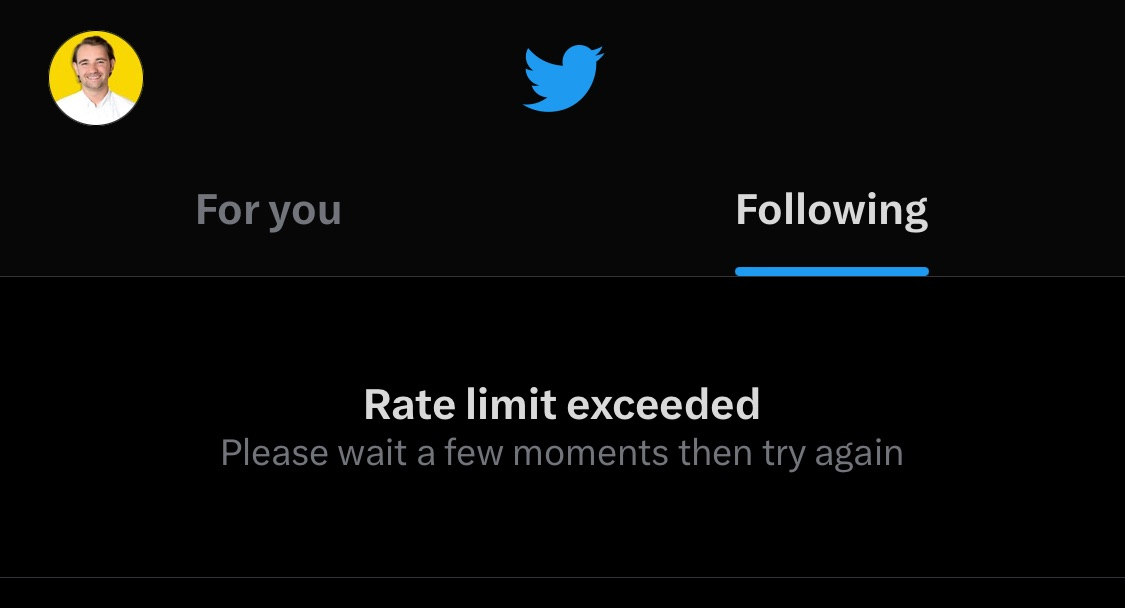
Rate limit exceeded Twitter is a notification indicating that you have surpassed the temporary usage limits set by Twitter. To control traffic, the platform establishes a specific quota for certain actions such as posting, liking, following, or refreshing the timeline within a specific timeframe. When this threshold is crossed, the system displays the rate limit exceeded message.
Why does Twitter apply these limits?
This regulation is primarily applied to control bots, automated tools, and unauthorized data scraping activities. Limiting helps reduce the load on server systems while maintaining a stable and safer experience for users.
Access limits between Verified and Unverified accounts:
According to official announcements from Twitter on July 1, 2023, the platform tightened its access limit policy to restrict automation and protect user data. The specific limits are applied as follows:
- Verified accounts (X Premium): Can view approximately 10,000 tweets/day
- Unverified accounts (long-standing): Can only scroll up to 1,000 tweets/day
- New unverified accounts: Strictly controlled at 500 tweets/day
When users exceed these thresholds in a short period, the system displays the rate limit exceeded warning and temporarily blocks access or newsfeed loading.
2. Why are you seeing the "Rate limit exceeded" error on Twitter?
If you suddenly receive the rate limit exceeded error Twitter, the cause could stem from daily browsing habits or support tools connected to your account. Here are the common reasons why your account quickly hits the limit:
- Refreshing the page (F5) too many times: Constantly reloading the page in a short period consumes the reading quota very quickly, especially for unverified accounts.
- High-frequency interaction: Performing actions like posting, following/unfollowing, liking, and sharing many posts in rapid succession makes the algorithm suspect spam behavior.
- Excessive use of third-party apps: Auto-scheduling apps or background tools that send too many requests or abuse API commands are common causes of quick quota depletion. If your work requires support software, you should research Twitter automation tools to set up a safe workflow and avoid being flagged.
- New or unverified accounts: X imposes extremely strict limits on this group to prevent the rise of spam bots.
- Server-side technical issues: Sometimes, the error isn't on the user's side but is due to system overload or maintenance, causing the rate limit message to appear for everyone.
3. How to fix the "Rate limit exceeded" error on Twitter easily
In most cases, the rate limit exceeded error is temporary and can be fixed quite simply. Try the methods below to get your account back to normal.
3.1. Wait for the limit to reset
Typically, the limit is reset by the system after about 15–30 minutes. During this time, you should stop all actions on Twitter, such as refreshing the timeline, retweeting, or interacting, so the system can re-identify the account as normal.
3.2. Revoke third-party app access
Some third-party apps might be sending background requests without you noticing. If the cause is background automation apps, remove them immediately:
-
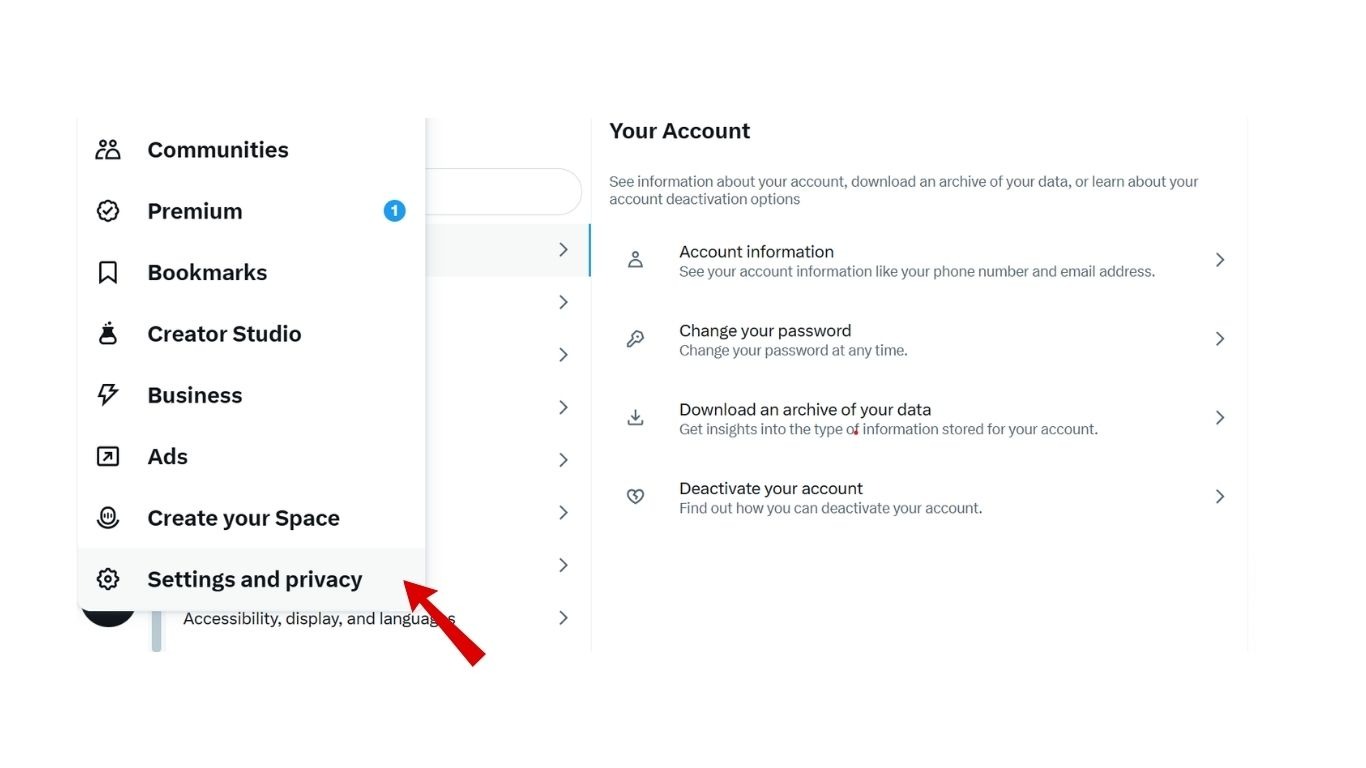
Step 1: Go to Settings on Twitter.
-
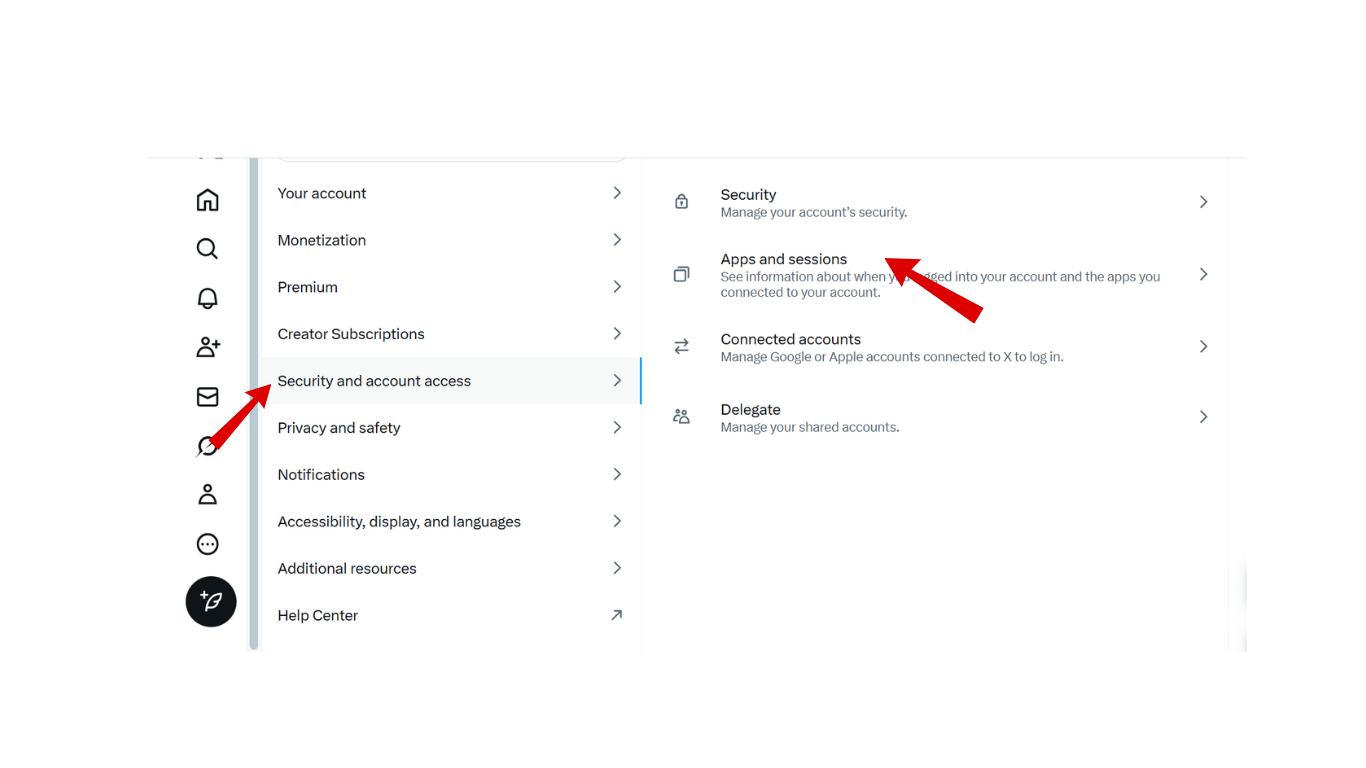
Step 2: Select Security and account access > Apps and sessions.
-
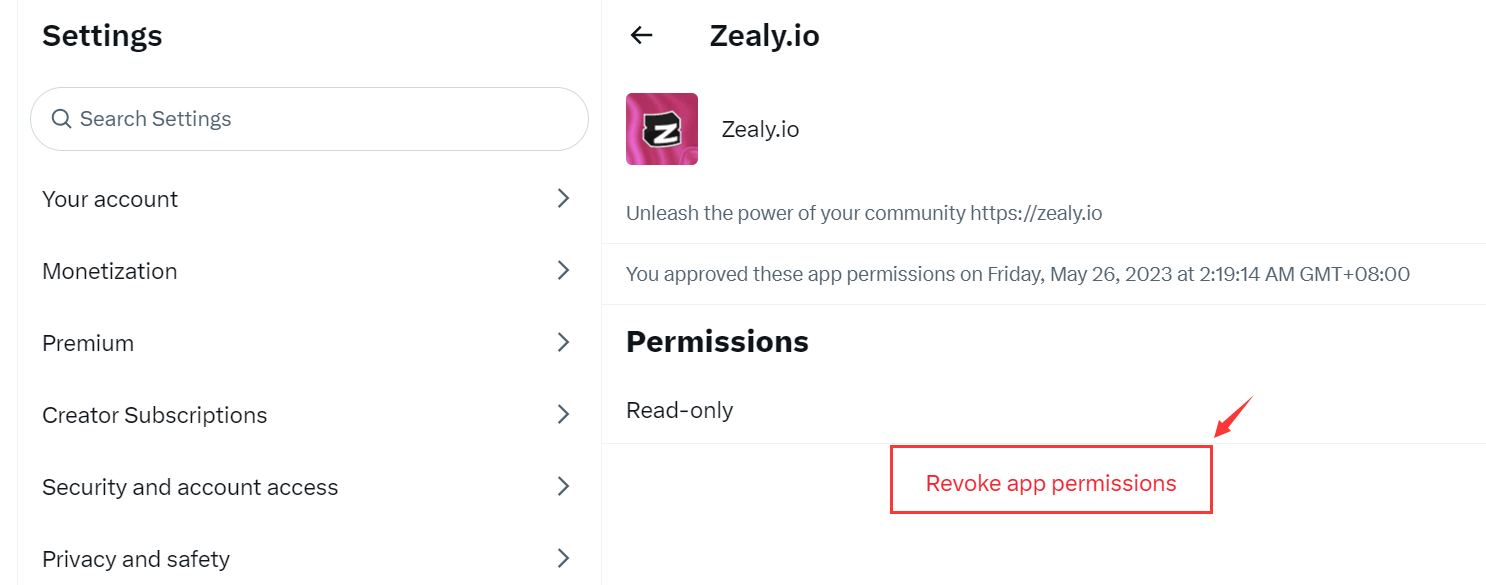
Step 3: Select Revoke app permission for apps that are not truly necessary.
3.3. Log out and log in
A traditional but effective method is logging out of your account on the device. Then, clear the cache of your browser or app and log back in.
3.4. Switch devices or browsers
If you encounter the error on the mobile app, try logging in via a web browser on a computer, or vice versa. Additionally, you can switch to a different Wi-Fi network or use mobile data to check if the error is connection-related.
3.5. Use a VPN or proxy
In some cases, Twitter's algorithm might apply local limits based on the network IP address. In such instances, changing your IP using a VPN or proxy can help reduce the chance of being blocked due to regional limits.
4. How to limit the Rate limit exceeded error on Twitter
To minimize interruptions from this error message, consider these principles while using your account:
- Upgrade to X Premium (Verified): Paying for the service grants significantly higher usage limits compared to regular accounts, especially after verifying your Twitter account according to platform requirements. However, note that X Premium does not bypass anti-spam systems. If behavior is still deemed automated or spam-like, the account may still encounter the rate limit exceeded message.
- Limit automation tools: Apps that auto-follow, unfollow, or interact in bulk are easily flagged as risky. If you must manage many accounts, understand how to create multiple accounts on X to reduce the risk of detection.
- Use Twitter moderately: Avoid spamming actions like likes, retweets, or follows in short bursts. Spacing out actions makes the account look more natural.
5. When does a Rate Limit lead to account restrictions?
If an account continually hits access thresholds in a short period, Twitter's algorithm will evaluate this as bot-like behavior. At that point, it’s no longer a temporary error but could lead to serious restrictions.
- Shadowban: Your posts can still be made but won't appear in search results, hashtags, or others' feeds. Check for signs of a Twitter shadowban if engagement drops unexpectedly.
- 3-day read-only mode: The account is locked from all interactive functions for 72 hours. You can only log in to view content.
- Permanent suspension: The heaviest penalty, usually applied for manipulating the platform or abusing automation for long periods. If your Twitter account is suspended, the risk of permanent loss is high.
6. Conclusion
The “Rate limit exceeded” notification on Twitter is essentially a temporary limit to control activity frequency and protect the system. In most cases, it does not harm the account and will disappear once you adjust your usage. However, letting it happen repeatedly might lead to more serious restrictions.
For those running multiple accounts, building a safe management process from the start is key. You can refer to: How to manage multiple social media accounts without getting banned.
7. FAQ
1. Why is Twitter showing "Rate limit exceeded" even though I haven't used it much?
It could be due to third-party apps running in the background, sharing an IP address with a spammer, or simply a platform server error.2. Why did Twitter limit my account to read-only for 3 days?
This happens when the system detects repetitive spam behavior or violations of community policies.3. How long does the rate limit exceeded error usually last?
Typically 15 to 30 minutes, but it can last up to 24 hours depending on the violation level.4. Does a VPN really fix the Rate limit error?
It works if the limit is applied to your IP address, but not if the limit is tied to your Twitter Account ID.5. Is "Rate Limit Exceeded" the same as a Shadowban?
No. Rate limit is a temporary technical barrier, while shadowban is a penalty where your posts are hidden from others.6. Does using X Pro help avoid limits?
Yes, X Pro uses a separate and more stable data stream, but it generally requires an X Premium subscription.